Open source · free · MIT license
VoiceWall: dictation that never leaves your machine
Press a shortcut, speak, and the text appears right where your cursor is: Word, Outlook, any application. Speech recognition runs 100 percent on your own machine: no server, no cloud, no account, no telemetry.
VoiceWall in 60 seconds
Press the shortcut, speak, text appears. The video is served from this domain: no YouTube, no third party, no tracking.
Dictation is confidential by nature
Clients, patients, contracts, personnel matters: the very sentences you would not want to type are the ones you speak into a microphone. Cloud dictation services send those sentences to somebody else's servers for recognition, often US providers, and hardly anyone reads what the privacy policy says about it. For professions bound to secrecy, that is not a convenience issue but a legal one.
VoiceWall is an auditor's answer to that pattern: a dictation tool that rules out data leakage not by contract clause, but technically. What never leaves your machine needs no safeguarding, no processing agreement and no renegotiation.
Evidence over claims
Many tools claim “100 percent local”. VoiceWall is built so you can verify it yourself:
The network-cable test
The hardest test is open to everyone: disconnect from the network and keep dictating. VoiceWall works fully offline because speech recognition runs on your machine, not on a server.
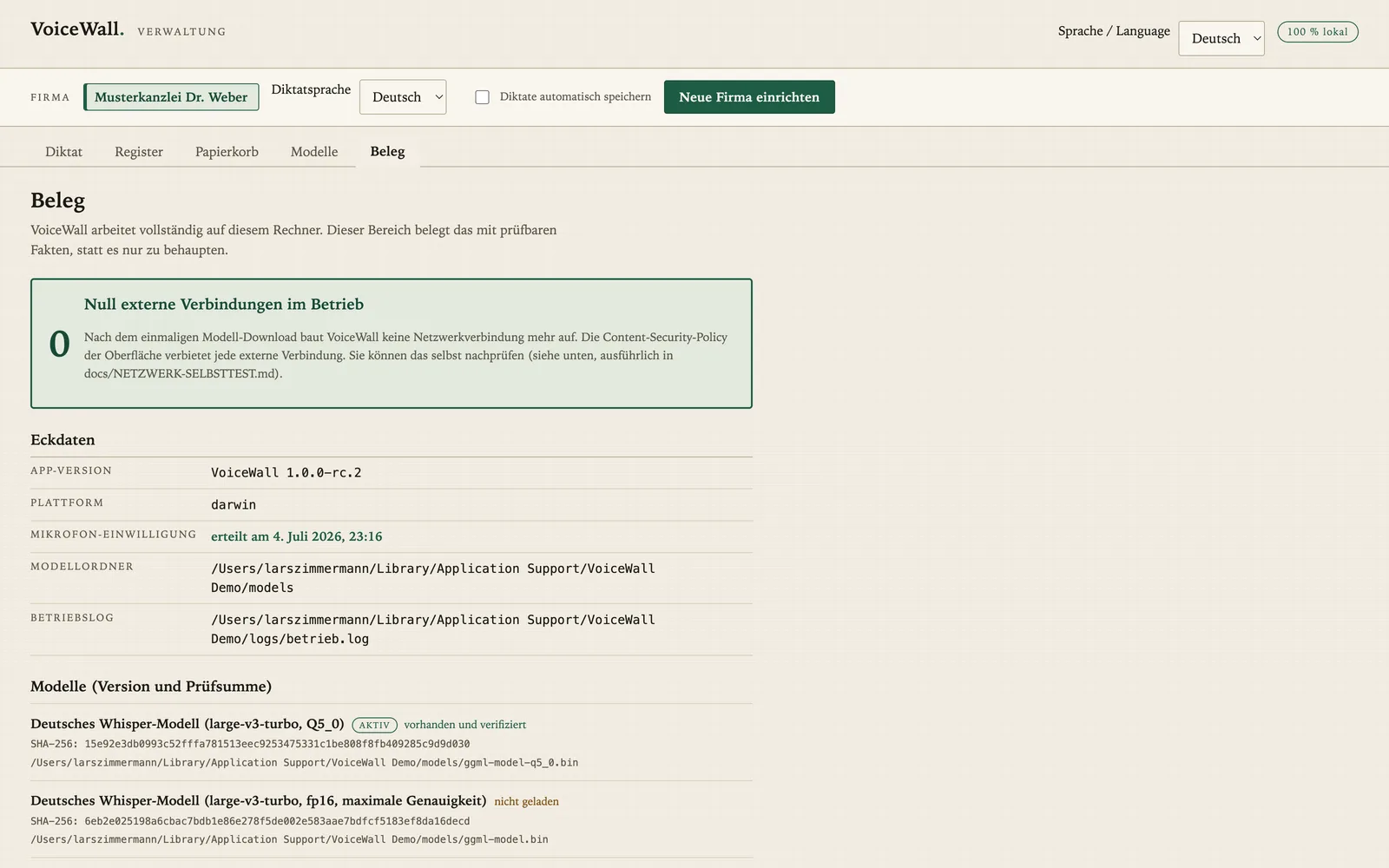
Zero external connections
The built-in network monitor shows zero outgoing connections during operation. No cloud, no telemetry, no account. Not a promise in the fine print, but verifiable live.
Verified AI models
Every speech model is verified against a pinned SHA-256 checksum during setup. You know exactly which model runs on your machine, and that it has not been tampered with.
Your dictations belong to you
All dictations live as portable Markdown files in your own folder, not in somebody else's database. Back up, search, take along: your data, your file system, your decision.
What you can use it for
Dictation is not just for medical reports. Wherever text is produced and the content is nobody's business but yours, local dictation plays to its strengths:
3×
faster than typing
Stanford study (Ruan et al., 2016)
161
words per minute dictated, vs. 53 typed
same study, English
0
external connections during operation
built-in network monitor
∞
words, no quota, free forever
open source, MIT license
Law firms & notaries
Briefs, file notes, client memos: dictated instead of typed, with case numbers and proper names handled cleanly by the specialist dictionary. Not a word leaves the office; confidentiality is preserved technically.
Medical practices & therapy
Dictate findings, referral letters and treatment notes right after the appointment, while everything is fresh. Patient data stays where it belongs: on your machine, not on a transcription server.
Tax advisory & audit firms
Working papers, client emails, review notes: spoken faster than typed. Client data does not pass through third-party infrastructure; professional law will thank you.
Software development
Speaking is several times faster than typing: dictate commit messages, code comments, documentation and above all long prompts for AI assistants. Your hands stay on the code.
Management & sales
Emails, minutes, visit reports handled between two meetings. Speak the thought, the text lands at your cursor, keep working. Personnel matters stay internal, too.
Writing without a keyboard
For everyone who finds long typing sessions hard, for instance with RSI or motor impairments, and for everyone who prefers speaking their drafts: articles, reports and book chapters as dictation, editable any time.
No privacy mode. No word quota.
Privacy is not a paid feature
With cloud dictation services, local processing is often an extra mode reserved for the paid tier: confidentiality at a surcharge. With VoiceWall there is nothing to toggle and nothing to book. There simply is no server your voice could go to. The only mode is the confidential one.
Unlimited dictation, free forever
Free tiers of many dictation services end after a few thousand words a month; after that, the subscription begins. VoiceWall does not count your words: no quota, no metering, no paywall. What runs on your machine costs nobody anything, so nobody needs to bill for it.
What VoiceWall does
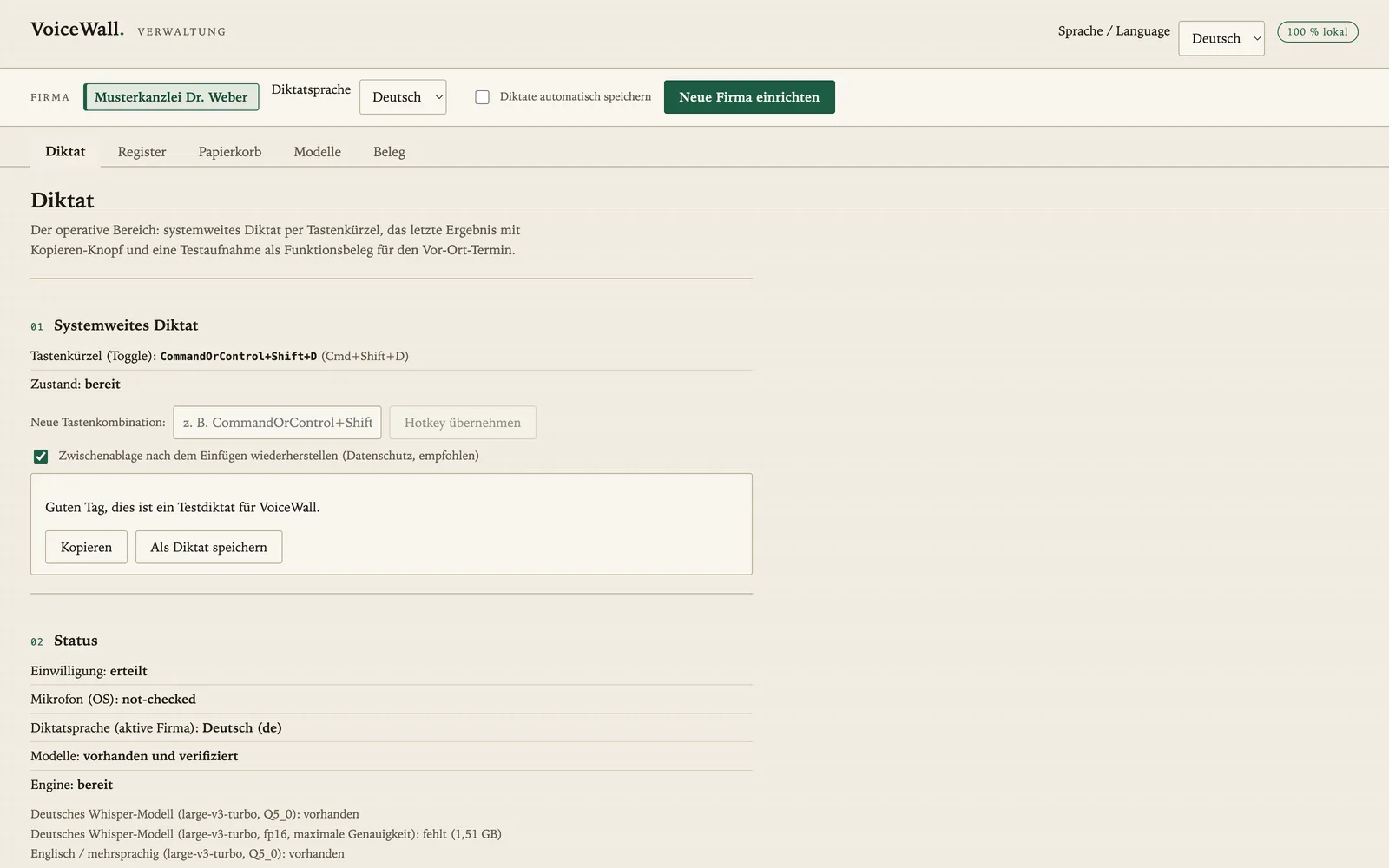
- Dictation via a global keyboard shortcut: the recognized text lands right at the cursor position, in any application.
- Whisper speech recognition, German-optimized, entirely on your device; recognizes German and English.
- Specialist dictionary for proper names, technical terms and case numbers, so domain vocabulary is recognized cleanly.
- Dictations as Markdown files in your own folder: searchable, portable, no database lock-in.
Ready in three steps
- Install Node 26 (free, link in the README).
- Download or clone the repository from GitHub.
- Double-click the setup. A wizard guides you through configuration; the speech model is downloaded once and checksum-verified. From then on, everything runs offline.
Honesty is part of the craft: on the Mac, the core path is fully tested and signed off. For Windows, field testers are still wanted. The full source code is public, including the automated test suite and a checksum chain for every model and native component. Verify it yourself.
Two ways to get VoiceWall
free
Install it yourself
Three steps, described in the README: install Node 26, download the repository, double-click the setup. A wizard guides you through the rest; after that everything runs offline.
To the GitHub repository€49 incl. German VAT
Have it set up for you
Not keen on self-installation? I set up VoiceWall together with you via screen sharing (Teams, TeamViewer or AnyDesk), worldwide. At the end you are dictating, and you have seen the evidence yourself.
Request a setup appointmentFrequently asked questions
Is VoiceWall really free?
Yes. VoiceWall is open source under the MIT license, with no subscription, no account and no premium tier. The complete source code is public on GitHub.
Where is my voice data sent?
Nowhere. Speech recognition (Whisper, German-optimized) runs entirely on your own machine. The built-in network monitor shows zero external connections during operation, and the network-cable test is open to everyone: keep dictating offline.
Is there a word limit or a paid tier?
No. VoiceWall has no word quota, no free trial tier and no paid plan behind it: unlimited dictation, free forever, MIT license. Privacy is not a bookable mode either, but the architecture itself: there is no server your voice could go to.
Which systems does VoiceWall run on?
macOS and Windows. On the Mac, the core path is fully tested and signed off. For Windows, field testers are still wanted; feedback and bug reports are explicitly welcome.
Do I need technical skills to set it up?
Three steps, described in the README: install Node 26, clone the repository, double-click the setup. A wizard guides you through the rest. The speech model is downloaded once and checksum-verified; after that, everything runs offline.
Can I have VoiceWall set up for me?
Yes. For a flat €49 (incl. German VAT) I set up VoiceWall together with you via screen sharing (Teams, TeamViewer or AnyDesk), worldwide. At the end of the session you are dictating, and you have seen the evidence (network monitor, checksums) with your own eyes.
Why does an AI auditor give away a tool like this?
Because cloud-connected dictation software ships confidential content to third-party servers, and hardly anyone reads the privacy policy closely enough to notice. VoiceWall shows it can be done differently: local, verifiable, open source. Evidence over claims is the same standard applied to audits here.
Verify it yourself
Source code, tests, checksums and a test guide are public on GitHub. And if you run a cloud tool you would rather have local and verifiable: exactly the kind of question we settle in a free intro call.